http://converter.telerik.com/
源码来自SharpDevelop(对应软件自带解决方案转码工具)
http://www.icsharpcode.net/OpenSource/SD/Download/Default.aspx#SharpDevelop5x
http://converter.telerik.com/
源码来自SharpDevelop(对应软件自带解决方案转码工具)
http://www.icsharpcode.net/OpenSource/SD/Download/Default.aspx#SharpDevelop5x
出处:http://blog.csdn.net/fmddlmyy/archive/2007/02/14/1510189.aspx
我曾经写过一篇《谈谈Unicode编码,简要解释UCS、UTF、BMP、BOM等名词》(以下简称《谈谈Unicode编码》),在网上流传较广,我也收到不少朋友的反馈。本文探讨《谈谈Unicode编码》中未介绍或介绍较少的代码页、Surrogates等问题,补充一些Unicode资料,顺带介绍一下我最近编写的一个Unicode工具:UniToy。本文虽然是前文的补充,但在写作上尽量做到独立成篇。
标题中的“浅谈”是对自己的要求,我希望文字能尽量浅显易懂。但本文还是假设读者知道字节、16进制,了解《谈谈Unicode编码》中介绍过的字节序和Unicode的基本概念。
0 UniToy UniToy是我编写的一个小工具。通过UniToy,我们可以全方位、多角度地查看Unicode,了解Unicode和语言、代码页的关系,完成一些文字编码的相关工作。本文的一些内容是通过UniToy演示的。大家可以从我的网站(www.fmddlmyy.cn)下载UniToy的演示版本。 1 文字的显示1.1 发生了什么?
出处:http://www.fmddlmyy.cn/text6.html
这是一篇程序员写给程序员的趣味读物。所谓趣味是指可以比较轻松地了解一些原来不清楚的概念,增进知识,类似于打RPG游戏的升级。整理这篇文章的动机是两个问题:
我很早前就发现Unicode、Unicode big endian和UTF-8编码的txt文件的开头会多出几个字节,分别是FF、FE(Unicode),FE、FF(Unicode big endian),EF、BB、BF(UTF-8)。但这些标记是基于什么标准呢?
查了查相关资料,总算将这些问题弄清楚了,顺带也了解了一些Unicode的细节。写成一篇文章,送给有过类似疑问的朋友。本文在写作时尽量做到通俗易懂,但要求读者知道什么是字节,什么是十六进制。
RowCount
GridView.RowCount Property | WinForms Controls | DevExpress Help
This property overrides the BaseView.RowCount property to increment its value in the following cases:
- the new item row is shown at the bottom (the View’s GridOptionsView.NewItemRowPosition property is set to the NewItemRowPosition.Bottom value);
- the new item row is hidden (the View’s GridOptionsView.NewItemRowPosition property is set to the NewItemRowPosition.None value) and a newly added row is being edited.
NoteDetail pattern Views do not contain data and they are never displayed within XtraGrid. So, the RowCount member must not be invoked for these Views. The RowCount member can only be used with real Views that are displayed within the Grid Control. The real Views with which an end-user interacts at runtime can be accessed using the following methods.
- GridControl.MainView – returns the top most View in a grid;
- GridControl.FocusedView – returns the focused View;
- GridControl.DefaultView – returns the currently maximized View;
- the sender parameter of View specific events;
- GetDetailView – returns a detail clone View for a specific master row.
DataRowCount
BaseView.DataRowCount Property | WinForms Controls | DevExpress Help
Note that data rows can be hidden within collapsed groups when data grouping is applied. The DataRowCount property returns the total number of data rows regardless of whether they are within collapsed groups or not. Also, the property’s return value is not always the same as the number of records within the associated data source. When data filtering is applied, the DataRowCount property returns the number of rows that match the filter condition.
NoteDetail pattern Views do not contain data and they are never displayed within XtraGrid. So, the DataRowCount member must not be invoked for these Views. The DataRowCount member can only be used with real Views that are displayed within the Grid Control. The real Views with which an end-user interacts at runtime can be accessed using the following methods.
- GridControl.MainView – returns the top most View in a grid;
- GridControl.FocusedView – returns the focused View;
- GridControl.DefaultView – returns the currently maximized View;
- the sender parameter of View specific events;
- GridView.GetDetailView – returns a detail clone View for a specific master row.
试比较:
Private Sub GridView1_MouseDown(sender As Object, e As MouseEventArgs) Handles GridView1.MouseDown
        Dim view As GridView = TryCast(sender, GridView)
        Dim hitInfo As GridHitInfo = view.CalcHitInfo(e.Location)
        Select Case hitInfo.HitTest
            Case GridHitTest.Column
                SelectColumn(view, hitInfo)
            Case Else                '
                view.OptionsSelection.MultiSelect = False
                view.OptionsSelection.MultiSelectMode = GridMultiSelectMode.RowSelect
        End Select
 End Sub

 Private Sub SelectColumn(ByRef View As GridView, ByRef hitinfo As GridHitInfo)
        '全选列(不排列)
        View.OptionsSelection.MultiSelect = True
        View.OptionsSelection.MultiSelectMode = GridMultiSelectMode.CellSelect
        View.OptionsCustomization.AllowSort = False
        View.ClearSelection()

        View.SelectCells(New GridCell(0, hitinfo.Column), New GridCell(View.DataRowCount - 1, hitinfo.Column))
        View.OptionsCustomization.AllowSort = True
End Sub
遇到一个问题。addhandler 与 handels的区别是什么
举例:如下语句运行成功
 Private Sub 供货商IDSearchLookUpEdit_TextChanged(sender As Object, e As EventArgs) Handles 供货商IDSearchLookUpEdit.TextChanged
        MsgBox(sender.name, MsgBoxStyle.OkCancel, "测试")
End Sub
如下语句不成功
Private Sub 主界面_Load(sender As Object, e As EventArgs) Handles MyBase.Load
    AddHandler 供货商IDSearchLookUpEdit.TextChanged, AddressOf 供货商IDSearchLookUpEdit_TextChanged
end sub

Private Sub 供货商IDSearchLookUpEdit_TextChanged(sender As Object, e As EventArgs)
        'Handles 供货商IDSearchLookUpEdit.TextChanged
        MsgBox(sender.name, MsgBoxStyle.OkCancel, "测试")
End Sub
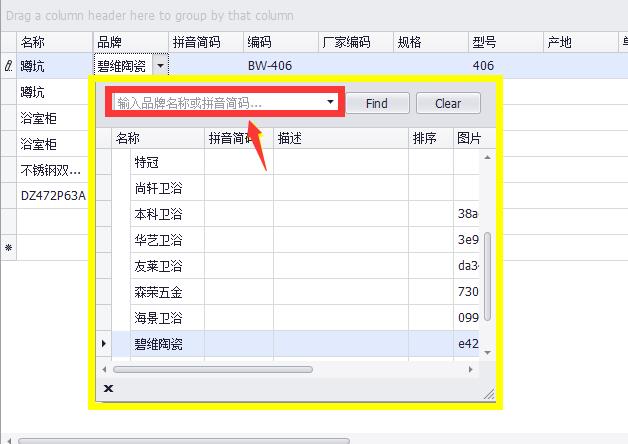
如图所示,在弹出时,自动对焦到红框区域。
 Private Sub 商品查找品牌RepositoryItemTreeListLookUpEdit_Popup(sender As Object, e As EventArgs) Handles 商品查找品牌RepositoryItemTreeListLookUpEdit.Popup
        Dim editor As TreeListLookUpEdit = CType(sender, TreeListLookUpEdit)
        editor.Properties.TreeList.ShowFindPanel()
End Sub
 Private Sub 商品查找商品RepositoryItemSearchLookUpEdit_Popup(sender As Object, e As EventArgs) Handles 商品查找商品RepositoryItemSearchLookUpEdit.Popup
        Dim editor As SearchLookUpEdit = CType(sender, SearchLookUpEdit)
        editor.Properties.View.ShowFindPanel()
End Sub
备份下载地址:链接: http://pan.baidu.com/s/1dF4oTfr 密码: dx4h
使用方法:完成之后在项目中引用安装目录中的ChnCharInfo.dll即可
实现汉字转拼音demo(原创)
Imports Microsoft.International.Converters.PinYinConverter
Module Demo
Public Enum 拼音格式
        首字母 = 0
        全拼 = 1
    End Enum

    Public Function 获取拼音码(ByVal inputText As String, Optional 拼音格式 As 拼音格式 = 拼音格式.首字母) As String
        if inputText is Nothing or inputText="" then
            return Nothing
        end if
        Dim PY As String = ""
        For Each Cha In inputText.Trim()
            Try
                Dim chinesechar As ChineseChar = New ChineseChar(Cha)
                Select Case 拼音格式
                    Case 拼音格式.首字母
                        PY += chinesechar.Pinyins(0).Substring(0, 1).ToLower
                    Case 拼音格式.全拼
                        PY += chinesechar.Pinyins(0).ToLower
                End Select
            Catch ex As System.NotSupportedException
                PY += Cha         ‘遇到非中文字符,直接原样返回
            Catch ex As Exception
                MsgBox(ex.Message)
            End Try
        Next
        Return PY
End Function
End Module
多音字不知如何处理,比如:蹲(dūn、cún )的结果为cún
来源:http://bbs.csdn.net/topics/390095462
举例:表如下
| ID | 名称 | 排序 |
| 1 | 测试1 | |
| 2 | 测试2 | |
| 3 | 测试3 | 2 |
| 4 | 测试4 | |
| 5 | 测试5 | 1 |
| 6 | 测试6 | 3 |
| 7 | 测试7 | 5 |
| 8 | 测试8 |
现需要按【排序】字段排序,且NULL在后
SELECT *
FROM 表
ORDER BY (IIf(IsNull(排序),1000,排序))
参考IIF用法:http://baike.baidu.com/link?url=5U8efxCJxo62stmF4PbFhusGY7WeqmOQ2FkRhpvpEuJiWY57Kw4u2X4D5BE_O8YAFjgR5oP4KGICrcUKiJxWh_
在安装完DexExpress后,启动VS2015每次创建新项目都弹出“未能正确加载“RoslynPackage”包”的对话框,解决方法如下:
1、删除以下文件夹%appdata%\Local\Microsoft\VisualStudio\14.0\ComponentModelCache (以防万一,请做好备份)
2、删除以下文件夹%appdata%\Local\Microsoft\VisualStudio\14.0\Extensions (以防万一,请做好备份)。P.S.无法删除的话就删除文件夹内的文件。
3、重新打开VS2015,程序自动扫描已安装的扩展并重新生成新的文件夹
'来源:http://www.vbforums.com/showthread.php?622242-TabControl-with-Close-button-on-TabPages-(with-Design-Time-support)

Option Strict On
Imports System.ComponentModel


<ToolboxBitmap(GetType(System.Windows.Forms.TabControl))>
Public Class TabControlEx
    Inherits System.Windows.Forms.TabControl

    Private Declare Auto Function SetParent Lib "user32" (ByVal hWndChild As IntPtr, ByVal hWndNewParent As IntPtr) As IntPtr
    Protected CloseButtonCollection As New Dictionary(Of Button, TabPage)
    Private _ShowCloseButtonOnCurrentTab As Boolean = True
    Private _ShowCloseButtonOnTabs As Boolean = False


    <Browsable(True), DefaultValue(True), Category("Behavior"), Description("Indicates whether a close button should be shown on each TabPage")>
    Public Property ShowCloseButtonOnCurrentTab() As Boolean
        Get
            Return _ShowCloseButtonOnCurrentTab
        End Get
        Set(ByVal value As Boolean)
            _ShowCloseButtonOnCurrentTab = value
            For Each btn In CloseButtonCollection.Keys
                btn.Visible = _ShowCloseButtonOnCurrentTab
            Next
            RePositionCloseButtons()
        End Set
    End Property


    <Browsable(True), DefaultValue(True), Category("Behavior"), Description("Indicates whether a close button should be shown on each TabPage")>
    Public Property ShowCloseButtonOnTabs() As Boolean
        Get
            Return _ShowCloseButtonOnTabs
        End Get
        Set(ByVal value As Boolean)
            _ShowCloseButtonOnTabs = value

            RePositionCloseButtons()
        End Set
    End Property

    Protected Overrides Sub OnCreateControl()
        MyBase.OnCreateControl()


        For Each item In CloseButtonCollection
            item.Value.Text = item.Value.Text.Trim & Space(4)
        Next

        RePositionCloseButtons()
    End Sub

    Protected Overrides Sub OnControlAdded(ByVal e As System.Windows.Forms.ControlEventArgs)
        MyBase.OnControlAdded(e)
        Dim tp As TabPage = DirectCast(e.Control, TabPage)
        Dim rect As Rectangle = Me.GetTabRect(Me.TabPages.IndexOf(tp))
        Dim btn As Button = AddCloseButton(tp)
        btn.Size = New Size(rect.Height - 1, rect.Height - 1)
        btn.Location = New Point(rect.X + rect.Width - rect.Height - 1, rect.Y + 1)
        SetParent(btn.Handle, Me.Handle)
        AddHandler btn.Click, AddressOf OnCloseButtonClick
        CloseButtonCollection.Add(btn, tp)
    End Sub

    Protected Overrides Sub OnControlRemoved(ByVal e As System.Windows.Forms.ControlEventArgs)
        Dim btn As Button = CloseButtonOfTabPage(DirectCast(e.Control, TabPage))
        RemoveHandler btn.Click, AddressOf OnCloseButtonClick
        CloseButtonCollection.Remove(btn)
        SetParent(btn.Handle, Nothing)
        btn.Dispose()
        MyBase.OnControlRemoved(e)
    End Sub

    Protected Overrides Sub OnLayout(ByVal levent As System.Windows.Forms.LayoutEventArgs)
        MyBase.OnLayout(levent)
        RePositionCloseButtons()
    End Sub

    Public Event CloseButtonClick As CancelEventHandler
    Protected Overridable Sub OnCloseButtonClick(ByVal sender As Object, ByVal e As EventArgs)
        If Not DesignMode Then
            Dim btn As Button = DirectCast(sender, Button)
            Dim tp As TabPage = CloseButtonCollection(btn)
            Dim ee As New CancelEventArgs
            RaiseEvent CloseButtonClick(sender, ee)

            If Not ee.Cancel Then
                If MsgBox("是否关闭 " + tp.Text.Trim + "标签?") = MsgBoxResult.Ok Then
                    Me.TabPages.Remove(tp)
                    RePositionCloseButtons()
                End If
            End If
            End If
    End Sub

    Protected Overridable Function AddCloseButton(ByVal tp As TabPage) As Button
        Dim closeButton As New Button
        With closeButton
            '' TODO: Give a good visual appearance to the Close button, maybe by assigning images etc.
            ''       Here I have not used images to keep things simple.
            .Text = "X"
            .FlatStyle = FlatStyle.Flat
            .BackColor = Color.FromKnownColor(KnownColor.ButtonFace)
            .ForeColor = Color.White
            .Font = New Font("Microsoft Sans Serif", 6, FontStyle.Bold)
        End With
        Return closeButton
    End Function

    Public Sub RePositionCloseButtons()
        For Each item In CloseButtonCollection
            RePositionCloseButtons(item.Value)
        Next
    End Sub

    Public Sub RePositionCloseButtons(ByVal tp As TabPage)
        Dim btn As Button = CloseButtonOfTabPage(tp)
        If btn IsNot Nothing Then
            Dim tpIndex As Integer = Me.TabPages.IndexOf(tp)
            If tpIndex >= 0 Then
                Dim rect As Rectangle = Me.GetTabRect(tpIndex)
                If Me.SelectedTab Is tp Then
                    btn.BackColor = Color.Red
                    btn.Size = New Size(rect.Height - 1, rect.Height - 1)
                    btn.Location = New Point(rect.X + rect.Width - rect.Height, rect.Y + 1)
                    btn.Visible = ShowCloseButtonOnCurrentTab
                Else
                    btn.BackColor = Color.FromKnownColor(KnownColor.ButtonFace)
                    btn.Size = New Size(rect.Height - 3, rect.Height - 3)
                    btn.Location = New Point(rect.X + rect.Width - rect.Height - 1, rect.Y + 1)
                    btn.Visible = Me.ShowCloseButtonOnTabs
                End If

                btn.BringToFront()
            End If
        End If
    End Sub

    Protected Function CloseButtonOfTabPage(ByVal tp As TabPage) As Button
        Return (From item In CloseButtonCollection Where item.Value Is tp Select item.Key).FirstOrDefault
    End Function
End Class